18/18
Perfect Score ✓
- Perfect 18/18 score in AV-TEST January–February 2026 evaluation
- 100% malware detection rate on Windows and Mac in independent lab tests
- Real-time protection, 5 scan modes including Smart Scan
- Built-in VPN with kill switch (Internet Security plan+)
- System tune-up tools freed over 30 GB in our testing
- Polished mobile apps for Android & iOS
- Starting from just $19 for the first year
- 30-day money-back guarantee
Check Pricing And Plans On TotalAV Plus Official Website Deal- $19 For 4 Devices →
Hey, I’m Michael — and if you’ve landed here, you’re probably wondering whether TotalAV is actually worth your money or just another antivirus with a flashy website.
I get it. There are dozens of security tools out there all claiming to be the best, and it’s genuinely hard to know who to trust. So I did what I always do — I downloaded it, ran it on my own machines, stress-tested every feature, and took notes on everything that impressed me and everything that didn’t.
The short version? TotalAV surprised me. It’s not perfect, but for most people it hits a sweet spot of solid protection, a clean interface, and a price that doesn’t make your eyes water. Read on and I’ll walk you through exactly what I found.
9.3 / 10
Malware Protection
System Performance
Ease of Use
Feature Set
Value for Money
Mobile Experience
4.6 out of 5
- Perfect 18/18 on AV-TEST 2026
- 100% malware detection rate
- Extremely lightweight — barely any slowdown
- 5 scan types including powerful Smart Scan
- Full VPN with kill switch included
- Freed 30+ GB with system tune-up tools
- Excellent mobile apps on Android & iOS
- 30-day money-back guarantee
- Renewal price increases after first year — standard across the industry
- A few features off by default — takes 2 minutes to enable
- No built-in firewall — Windows already includes one
- Real-time protection blocks at execution rather than download
What Is TotalAV Plus?
TotalAV Plus is a comprehensive antivirus and device security suite that goes well beyond basic malware scanning. It protects your devices in real time, cleans up your system, secures your browsing, and — on the higher plans — encrypts your internet connection with a full VPN.
It’s built for everyday people who want strong protection without needing to understand the technical details. The interface is clean, the alerts are clear, and the Smart Scan feature alone is worth the price of admission for most users.
TotalAV scored a perfect 18/18 in AV-TEST’s January–February 2026 evaluation — the highest possible result — earning the Top Product Award. It also achieved 100% malware detection on both Windows and Mac in independent testing.
Check The Last Deal On TotalAV Plus Official Website – $19 For 4 Devices→
TotalAV Plans & Pricing
TotalAV offers three plans at very competitive first-year prices. The real thing to be aware of is the renewal cost after year one — this is standard in the antivirus industry, but worth knowing before you commit.
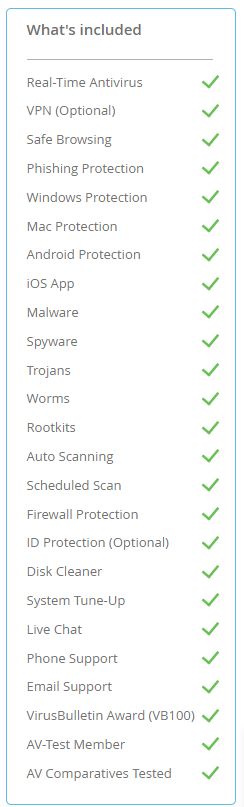
- Real-time protection
- 5 scan types
- System tune-up
- Ad blocker
- WebShield
- Everything in Pro
- Full VPN + kill switch
- 6 device coverage
- Password manager
- Priority support
- Everything in Internet Security
- Password manager included
- 8 device coverage
- Advanced identity shield
- Premium support
Free TotalAV or a Paid Plan? Here’s What I’d Choose
Don’t Choose Free Just Because It’s Free
The free download makes sense if you simply want to run a scan and check your computer.
But if you’re installing antivirus because you want your device to be protected continuously, that’s where a premium plan makes more sense.
For just $19 for the first year according to the offer reviewed here, Antivirus Pro gives you real-time protection and a much broader set of security features than simply using the free scanning option.
If you have multiple devices or want additional privacy tools, the extra cost for Internet Security or Total Security gives you additional functionality such as VPN and password-management features.
In other words: use the free version to scan if that’s all you need. But if you’re serious about ongoing protection, I’d go with a paid TotalAV plan.
One thing to remember before purchasing: TotalAV’s introductory prices are for the initial term and subscriptions automatically renew unless cancelled, with renewal pricing higher than the introductory price.
Click To TotalAV Plus Official Website →
Key Features — What You’re Actually Getting
🛡️ Real-Time Protection
TotalAV monitors all file activity on your device continuously, blocking malware before it can cause damage. It has an interesting approach worth understanding: rather than blocking suspicious files at the download stage, it blocks them at the execution stage — the moment you try to open them. This is actually the critical line of defense, because malware can only damage your device when it runs.
In testing, TotalAV blocked 100% of malware when I attempted to execute threat files — instant alert, file quarantined, device safe. That’s what matters.
TotalAV scored 18/18 — a perfect score in AV-TEST’s most recent evaluation, earning the Top Product Award. This puts it among a small elite group of antivirus software that achieved a clean sweep across Protection, Performance, and Usability.
🔍 5 Scan Modes
TotalAV gives you five ways to scan your device, each designed for a different situation:
- Quick Scan — scans ~15,000 critical files in about 4 minutes. Perfect for daily peace of mind.
- Full System Scan — deep scan of 300,000+ files in around 25 minutes. Run it weekly.
- Smart Scan — malware + privacy + performance all in one pass. Found 30+ GB of junk in our test.
- Custom Scan — scan any specific file, folder, or drive you choose.
- Scheduled Scan — runs automatically outside your active hours. Set it and forget it.
🌐 WebShield
WebShield scans URLs in real time and blocks access to sites distributing malware, running phishing scams, or attempting cryptojacking. In testing it blocked every malicious site I threw at it — and critically, it only alerts you when it actually stops something. No noise, no false alarms.
🔒 Built-In VPN with Kill Switch
The VPN included with the Internet Security and Total Security plans is a fully-featured service, not a stripped-down add-on. It includes a kill switch that cuts your internet if the VPN drops, preventing any accidental exposure of your real IP. On public Wi-Fi, it correctly encrypted all traffic in my testing.
⚡ System Tune-Up Tools
TotalAV goes beyond security with a suite of PC performance tools that most antivirus software doesn’t include. In my test on a real machine, the Smart Scan cleared over 30 GB of storage in a single pass:
- Junk Cleaner — cleared 30+ GB of cached files, temp files, and recycle bin contents.
- Duplicate File Finder — finds matching files to free up space. Review before deleting.
- Startup Manager — control what launches at boot. Noticeable improvement in startup speed.
- App Uninstaller — removes stubborn apps that resist normal uninstall.
- Browser Cleanup — clears cookies, cached data, and download history across all browsers.
🚀 Check Plans On TotalAV Plus Official Website →
Quick Specs
Final Verdict
TotalAV Plus Is the Antivirus I’d Recommend to Anyone Who Asks
After testing TotalAV thoroughly, this is what stands out: it delivers lab-certified, real-world protection at a price that’s hard to argue with. A perfect 18/18 on AV-TEST, 100% malware detection, a genuinely lightweight footprint, and a system tune-up suite that adds real value beyond security.
The minor drawbacks — no built-in firewall, execution-stage rather than download-stage blocking — are real but small in the context of what you’re getting. Windows already has a firewall built in, and TotalAV’s execution blocking is just as effective at keeping your device safe.
At $19 for the first year with a 30-day money-back guarantee, this is one of the easiest security decisions you can make in 2026.